

Let’s be real: a new AI content tool seems to launch every other day, right?
It’s a jungle out there. Some tools promise you the moon, claiming they’ll triple your traffic overnight. Others… well, they just spit out robotic-sounding garbage that’s completely unusable.
Trying to find the best AI content writing tools that actually move the needle can feel like a full-time job.
That’s exactly why I put this guide together.
I’ve spent countless hours in the trenches—testing, comparing, and using dozens of these platforms for real client campaigns. I’ve sifted through the hype to find what truly works. This isn’t just a lazy list of features copied from a pricing page. This is a battle-tested breakdown of the tools that help you create content that ranks, engages, and converts.
In this guide, we’ll dive deep into the big players like Jasper, but also check out powerful newcomers like SEObotai.com and Outrank.so. You’ll get the straight scoop on what each tool is best for, who it’s built for, and—just as important—where it falls short.
Whether you’re an eCommerce store owner trying to pump out product descriptions, a B2B SaaS company hunting for organic leads, or a local business trying to dominate your city’s search results, this guide will help you make a smart decision.
We’ll cover everything from key features and pricing to specific use cases, complete with direct links and screenshots. My goal is simple: to help you skip the expensive trial-and-error phase and find the perfect AI partner to scale your content strategy, fast. Let’s dive in.
1. Jasper
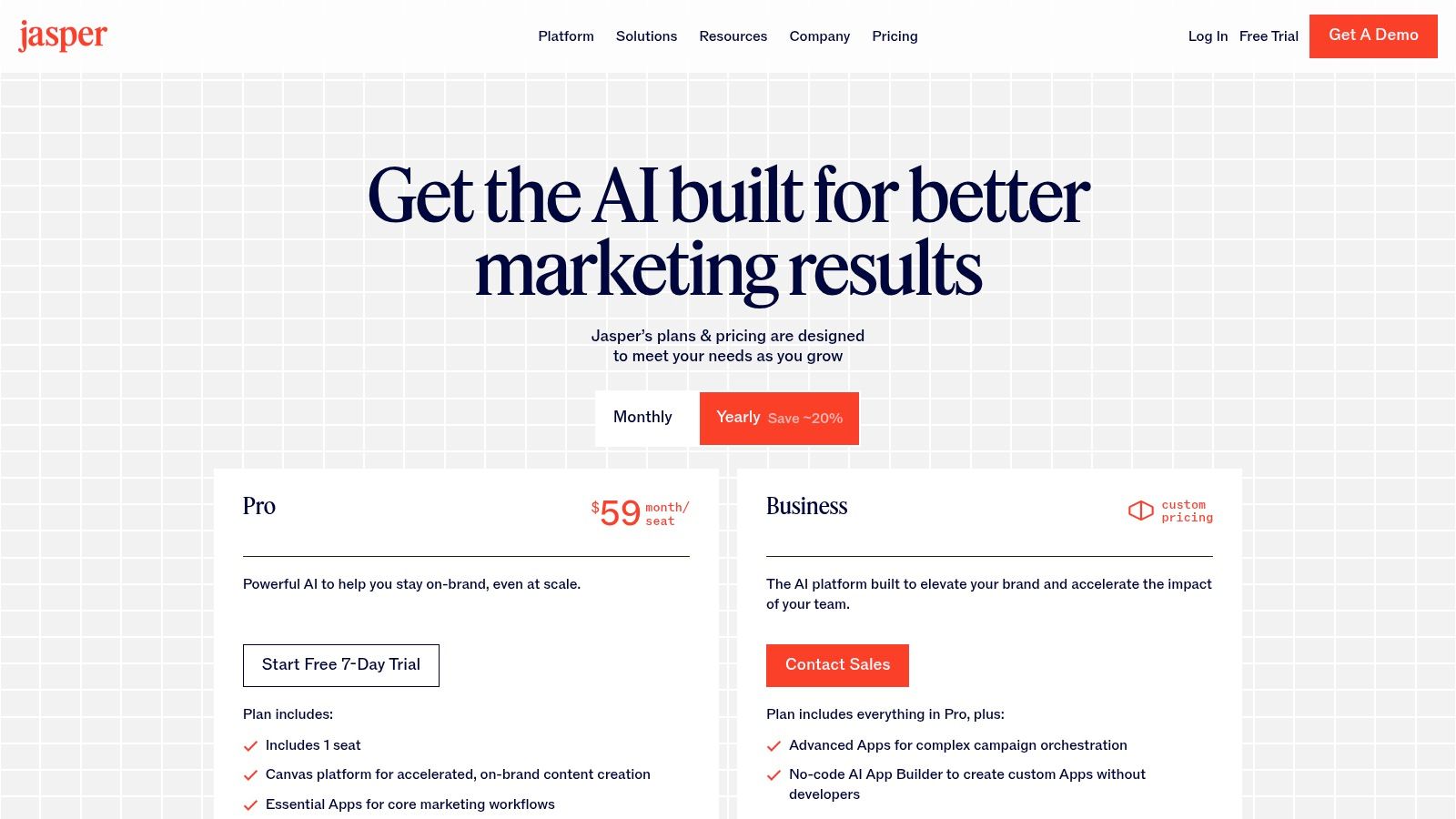
Jasper (you might remember it as Jarvis) is one of the OGs in the AI writing space. And honestly, it still holds its own as one of the best AI content writing tools, especially for marketing teams that mean business. Think of it less as a simple writing assistant and more like a complete content platform designed to keep your brand’s voice consistent across everything—from Facebook ads to 3,000-word blog posts.
So, what makes Jasper stand out in a crowded field? Its laser focus on enterprise-grade features.
The “Brand Voice” feature is a total game-changer. You can literally feed it your style guides, product catalogs, and company fact sheets. Jasper then learns your specific tone, style, and key info. The result? Every piece of content, no matter who on your team creates it, sounds like it came from a single, expert source: your brand.
Key Features & Use Cases
Jasper is a beast when it comes to structured content. This makes it perfect for teams that need to scale their output without sacrificing quality. Its huge library of templates and “recipes” (pre-built workflows) can guide you through creating pretty much anything you can think of.
- Best For: Marketing teams in SMEs, B2B companies, and agencies that need tight control over brand messaging and collaborative workflows.
- Standout Feature: The Brand Voice and Memories feature. It allows Jasper to remember context and stick to your brand guidelines across all the content it generates. It’s awesome.
- Practical Tip: Grab the browser extension. It brings Jasper’s AI smarts directly into Google Docs, WordPress, or even your email client. It’s a massive workflow accelerator.
Pricing and Limitations
Jasper’s pricing is aimed squarely at professional teams, not solo bloggers. It’s powerful, but that power comes at a price.
| Plan | Starting Price | Key Limitation |
|---|---|---|
| Creator | $49/month | 1 user seat, limited Brand Voice features |
| Pro | $69/month | Collaboration features, 3 Brand Voices |
| Business | Custom Pricing | Full API access, unlimited features, advanced admin controls |
The main downside is the seat-based pricing on the Pro plan, which can get pricey fast as your team grows. And if you want the full API and custom integrations, you have to jump to the expensive Business plan. That said, they offer a 7-day free trial so you can take it for a spin before you commit.
2. Copy.ai
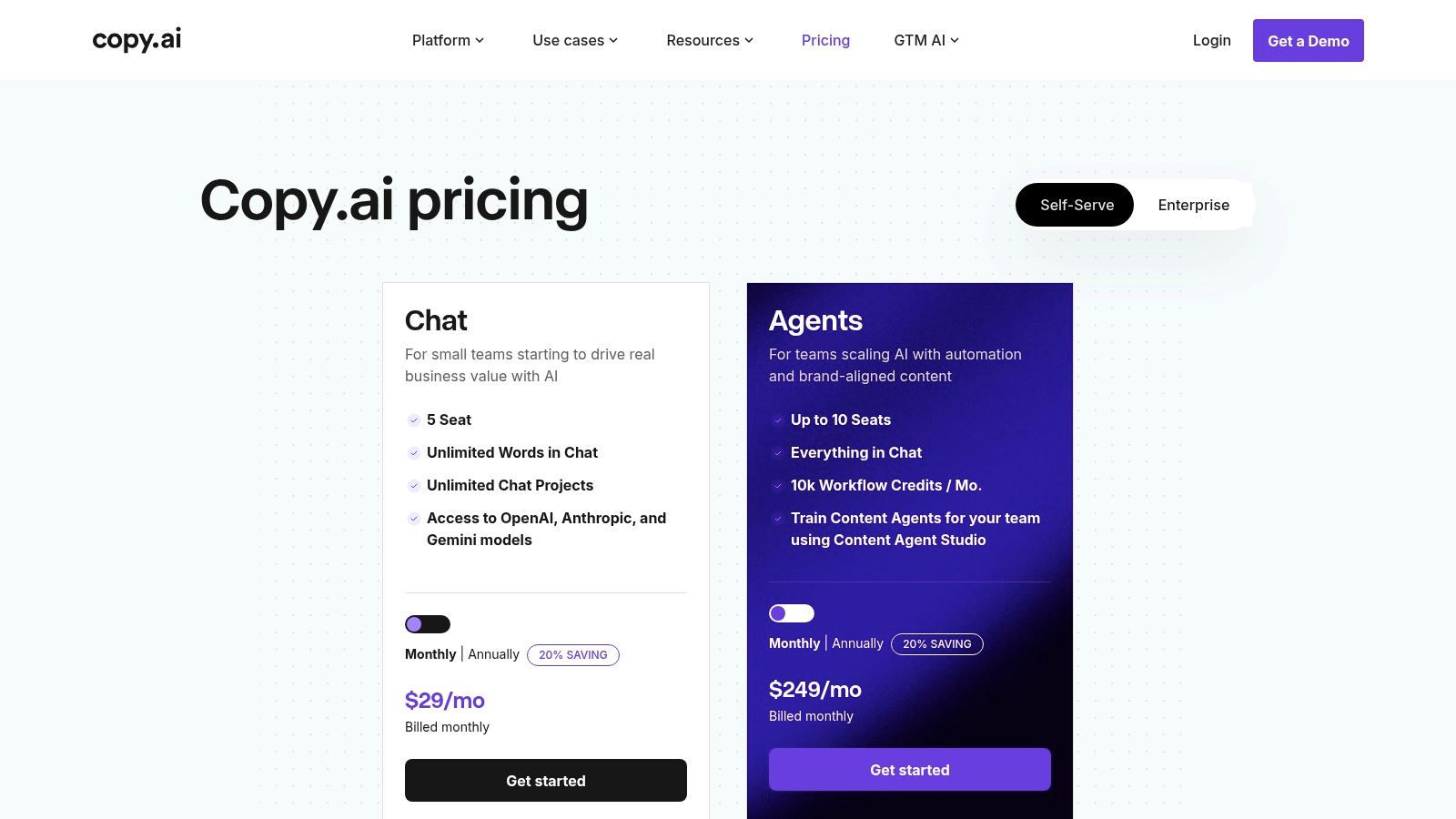
Copy.ai has shifted its game. It’s not just a content generator anymore; it’s positioning itself as a full-blown GTM (Go-to-Market) platform. It’s one of the best AI content writing tools for teams that need to do more than just write—they need to put that content to work. Instead of a blank page, Copy.ai gives you “Workflows” that can automate entire chains of tasks, like turning a YouTube video into a blog post, a LinkedIn update, and a series of tweets.
The secret sauce here is its “Content Agent” tech. You can build and train custom AI agents that get your brand voice, products, and target audience. These agents can then run complex, multi-step tasks on their own. Think generating personalized outreach emails from a list of leads or creating sales battle cards. It’s all about operationalizing your content at scale.
Key Features & Use Cases
Copy.ai is built for speed and automation. It’s a go-to for sales and marketing teams looking to put repetitive content tasks on autopilot. The Chat interface is also cool because it gives you access to multiple AI models (from OpenAI, Anthropic, and Google), so you can pick the best engine for whatever you’re working on.
- Best For: Sales teams, GTM leaders, and marketing managers who want to automate things like lead nurturing and content repurposing.
- Standout Feature: The Workflow builder. It lets you create reusable, automated sequences that turn one piece of input into a bunch of different content outputs. It’s a massive time-saver.
- Practical Tip: Start with a pre-built Workflow from their library to see how it works. Then, customize it for your own process. For example, you could set up a workflow that turns customer testimonials into case studies and social media posts automatically.
Pricing and Limitations
Copy.ai has a surprisingly good free tier. But its real power is in the paid plans, which use a credit system for workflows that can be a little confusing at first.
| Plan | Starting Price | Key Limitation |
|---|---|---|
| Free | $0/month | 2,000 words, 1 user seat, limited workflow credits |
| Pro | $49/month | 5 user seats, unlimited words and Brand Voices |
| Team | $249/month | 20 user seats, full access to workflows & API |
Bottom line: The really cool automation features are in the higher-tier plans. The Pro plan is great for writing, but the workflow magic is in the Team plan and up, which is a big price jump for smaller businesses.
3. Writesonic
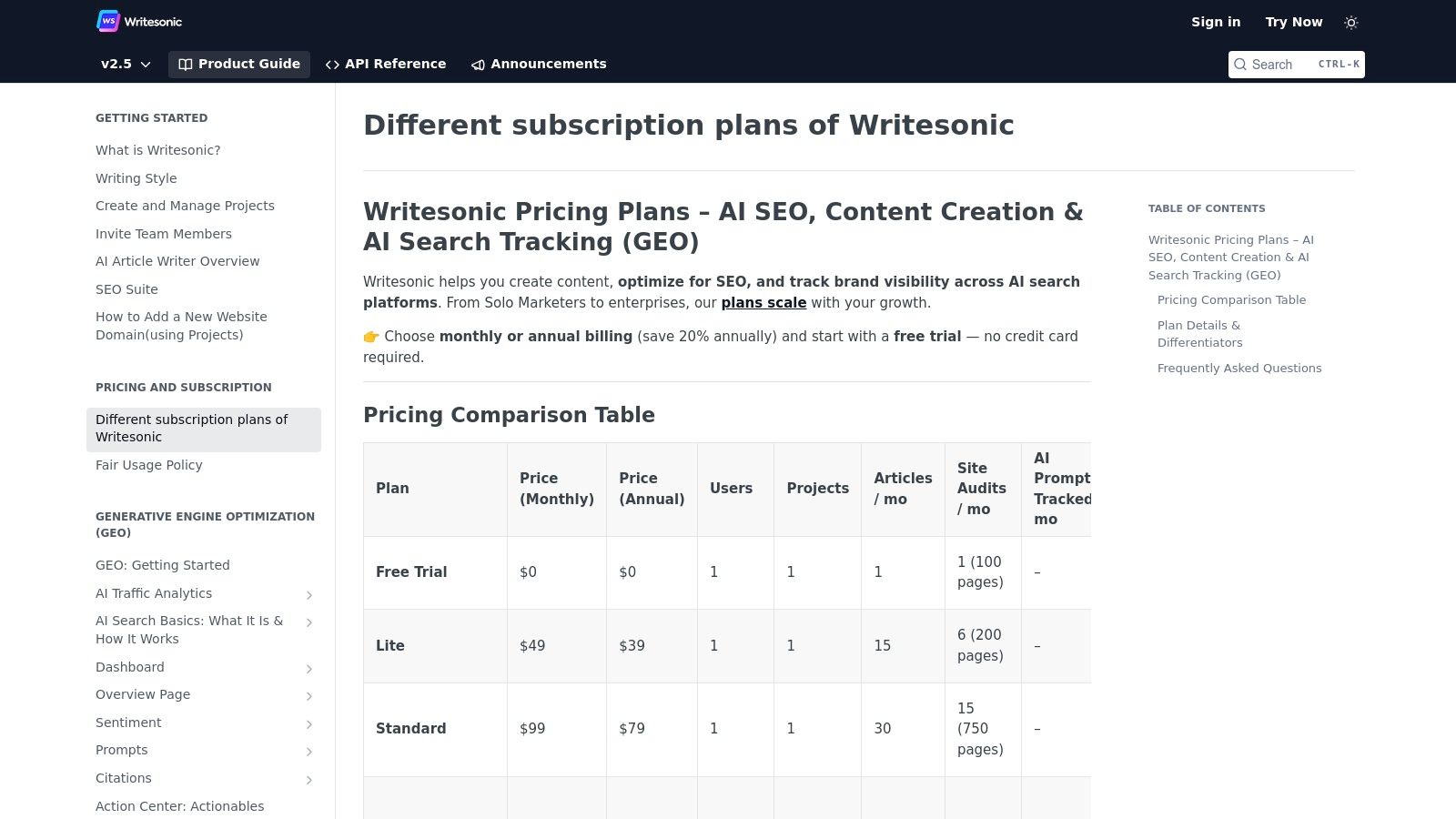
Writesonic has carved out a nice spot for itself as a powerful, all-in-one platform that smartly mixes AI writing with a solid set of SEO tools. It’s an awesome choice for businesses and marketers who need content that doesn’t just read well but is actually engineered to rank on Google. While some tools just focus on generating text, Writesonic bakes in features like AI-powered search monitoring and site audits. This makes it one of the best AI content writing tools for anyone thinking about the big picture of content strategy.
What really makes Writesonic stand out is its balanced approach. You get advanced features like Photosonic (for AI images), Audiosonic (for text-to-speech), and Botsonic (for building custom AI chatbots)—all under one roof. This turns it into a super versatile content creation hub, especially for smaller teams that don’t want to pay for five different specialized tools. It streamlines the whole process, from keyword research all the way to hitting “publish” and tracking performance.
Key Features & Use Cases
Writesonic is built for people who need to crank out a high volume of SEO-optimized content, from blog posts to product descriptions. Its built-in SEO checker and integrations make it a strong player for any data-driven content marketing campaign.
- Best For: Solopreneurs, bloggers, and small marketing teams who need an affordable, do-it-all tool for both content creation and SEO.
- Standout Feature: The built-in suite of SEO tools. Getting site audits and GEO/AI Overviews monitoring right next to your writing tools is incredibly useful.
- Practical Tip: Try the “Article Writer 5.0” feature. Give it a competitor’s URL. Writesonic will analyze it and generate a factually accurate, SEO-optimized article on the same topic. It can save you a ton of research time.
Pricing and Limitations
Writesonic’s pricing is competitive, making it pretty accessible. One thing to know is that their plans and features can change, so it’s always a good idea to check their site for the latest info.
| Plan | Starting Price | Key Limitation |
|---|---|---|
| Free Trial | $0/month | Limited to 10,000 words, basic features only |
| Business | $19/month | Based on user seats and word count, advanced features |
| Enterprise | Custom Pricing | Unlimited words, custom branding, dedicated support |
The main catch can be the periodic updates to their plans, which can lead to some confusion if you’re looking at outdated reviews. Also, the Business plan uses a credit system, so you have to keep an eye on your usage for different quality tiers.
4. SEObotai.com
SEObotai.com is a new player on the scene, but it’s making waves for one simple reason: it’s built from the ground up for SEOs. This isn’t a general-purpose writing tool with a few SEO features bolted on. It’s a dedicated platform designed to help you create content that dominates the SERPs. It’s quickly becoming one of the best AI content writing tools for people who live and breathe organic search.
What sets it apart is its deep integration of real-time SERP data. Before you even write a word, you can analyze the top-ranking pages for your target keyword. The tool pulls in data on headings, common questions, and related keywords, giving you a data-backed blueprint for your article. It’s all about creating content that doesn’t just guess what Google wants, but knows.
Key Features & Use Cases
SEObotai.com is designed to streamline the entire SEO content workflow, from research and outlining to writing and optimizing. It’s built for efficiency and ranking performance.
- Best For: SEO professionals, content marketing agencies, and businesses that are serious about using content to drive organic traffic.
- Standout Feature: The “Factual Content” module. It uses real-time data to ensure your content is accurate and up-to-date, which is a huge factor for E-E-A-T and topical authority.
- Practical Tip: Use the SERP analysis feature to build your outline. Instead of starting from scratch, let the tool show you the common structure and subtopics that are already ranking, then build your unique angle from there.
Pricing and Limitations
SEObotai.com’s pricing is competitive, especially considering its specialized feature set. It’s positioned as a professional tool for those focused on ROI from SEO.
| Plan | Starting Price | Key Limitation |
|---|---|---|
| Starter | $29/month | Lower limits on articles and credits |
| Pro | $99/month | Higher limits, more team members |
| Agency | Custom Pricing | Unlimited usage, white-label options |
The main limitation is its specialization. If you’re looking for an AI tool to write creative social media copy or sales emails, this isn’t it. It’s a focused, powerful SEO tool, and it doesn’t pretend to be anything else.
5. Outrank.so

Outrank.so is another powerful contender that firmly plants its flag in the SEO content camp.
It’s an AI-powered platform that guides you through the entire process of creating high-ranking long-form content. What makes it one of the best AI content writing tools is its methodical, step-by-step approach. It doesn’t just give you a text editor; it gives you a strategic workflow.
The platform excels at helping you build comprehensive, topically-authoritative content. It analyzes the SERPs and provides a detailed content brief, including key topics to cover, word count targets, and even internal linking suggestions. It’s like having an SEO strategist and a writer in one tool, guiding your hand to make sure every piece of content you create has the best possible chance to rank.
Key Features & Use Cases
Outrank.so is all about building pillar pages and in-depth articles that cover a topic from every angle. Its AI is trained to help you achieve topical relevance, a key factor in modern SEO.
- Best For: Content strategists, in-house SEO teams, and anyone focused on building topical authority through long-form, pillar content.
- Standout Feature: The automated content brief and optimization score. As you write, the tool gives you a real-time score based on how well you’re covering the necessary topics, keeping you on track to create a comprehensive article.
- Practical Tip: Don’t skip the “Questions to Answer” section in the content brief. Answering these user questions directly in your content is a killer way to optimize for featured snippets and People Also Ask boxes.
Pricing and Limitations
Outrank.so’s pricing reflects its status as a premium, strategy-focused tool. It’s an investment for teams who are serious about their content’s performance.
| Plan | Starting Price | Key Limitation |
|---|---|---|
| Solo | $60/month | Limited to 1 user and a set number of documents per month |
| Pro | $107/month | More documents, more users, and additional features |
| Agency | $174/month | Higher limits designed for agency-level output |
The main drawback is that it might be overkill for someone who just needs to write a quick product description or social media post. Its strength is in detailed, long-form content, and the workflow is designed around that. There can also be a bit of a learning curve to get the most out of all its strategic features.
6. Notion (with Notion AI)
Notion has gone from being a favorite productivity app to a serious player among the best AI content writing tools. It’s done this by weaving its AI capabilities right into its connected workspace. This isn’t a standalone writer; it’s an all-in-one environment where you can research, outline, draft, and organize your content without ever switching tabs. If your team already lives in Notion for project management, this is a no-brainer.
The real power of Notion AI is its context. The AI operates right inside your existing documents, databases, and project boards. This means it can summarize your meeting notes, draft an SOP based on project data, or brainstorm blog ideas that are actually relevant to your team’s wiki. It’s built for a seamless workflow, changing how teams create and manage content from a single source of truth.
Key Features & Use Cases
Notion AI is brilliant at turning messy, unstructured information into clean, written content. It’s perfect for turning a chaotic brainstorm into a coherent outline or boiling down long research docs into key takeaways—all inside the page you’re already working on.
- Best For: Teams that are already deep in the Notion ecosystem, content managers creating SOPs, and businesses that want to merge their knowledge base with their content creation process.
- Standout Feature: Using AI directly within database properties. You can auto-generate summaries, extract key data, or draft content contextually for every item in a database. It’s incredibly powerful.
- Practical Tip: Use the “Ask AI” block to query your entire workspace. For example, ask it to “find all documents related to our Q4 content strategy and summarize the key themes.” It will instantly pull together information from all over your Notion.
Pricing and Limitations
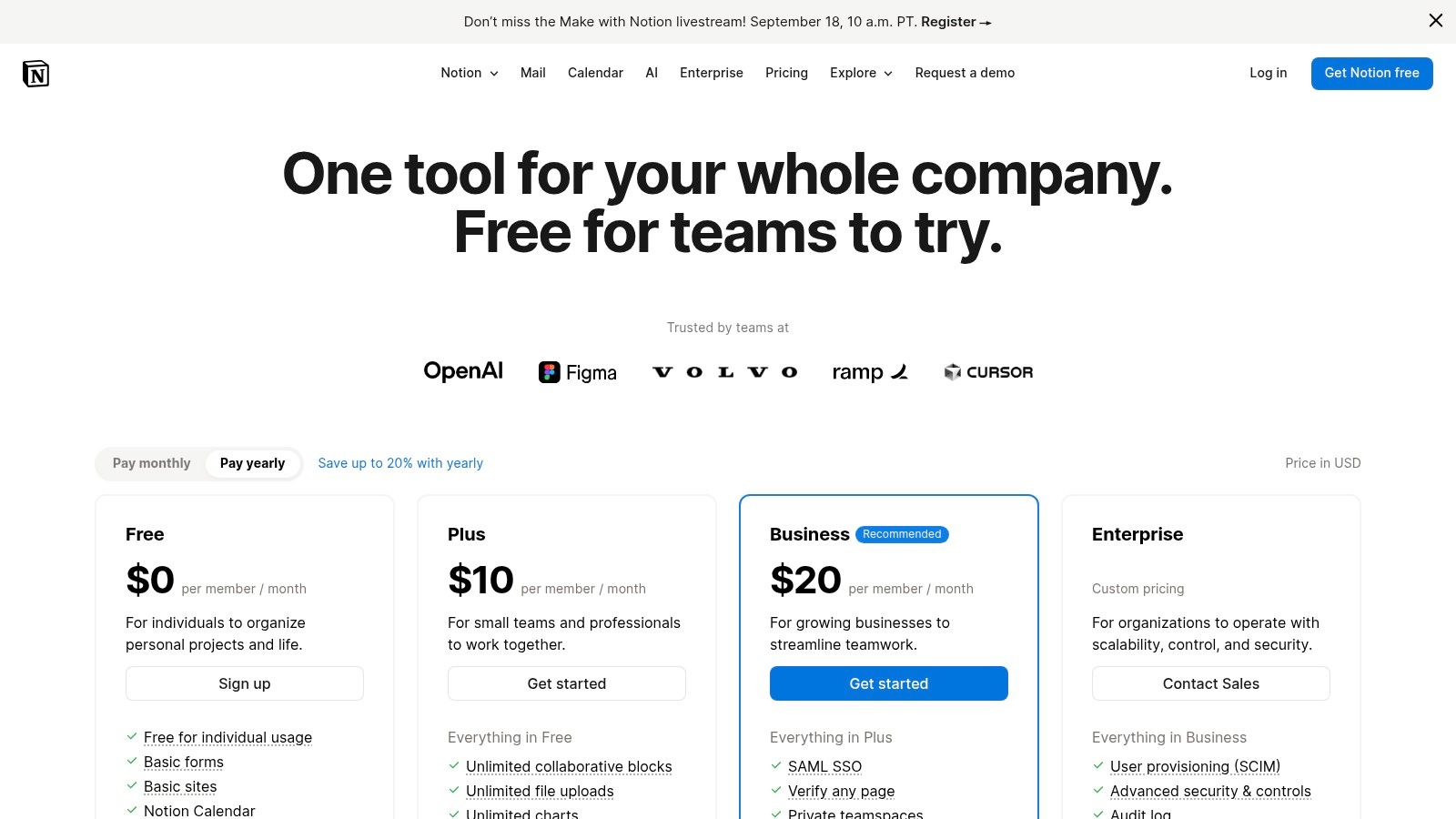
Notion’s pricing has changed, and its full AI suite is now mostly bundled into its higher-tier plans. While powerful, this makes it less of a casual add-on and more of a strategic investment.
| Plan | Starting Price | Key Limitation |
|---|---|---|
| Plus | $10/user/month | Trial AI access, must purchase AI add-on for full use. |
| Business | $18/user/month | Includes Notion AI, enterprise search, and advanced features. |
| Enterprise | Custom Pricing | Unlimited AI usage, advanced security, and dedicated support. |
The main downside is that the full AI features are now gated behind the Business and Enterprise plans for new users, making it a pricey option for smaller teams. Also, because it does so much, there’s a steeper learning curve compared to a simple, dedicated AI writer.
7. Rytr
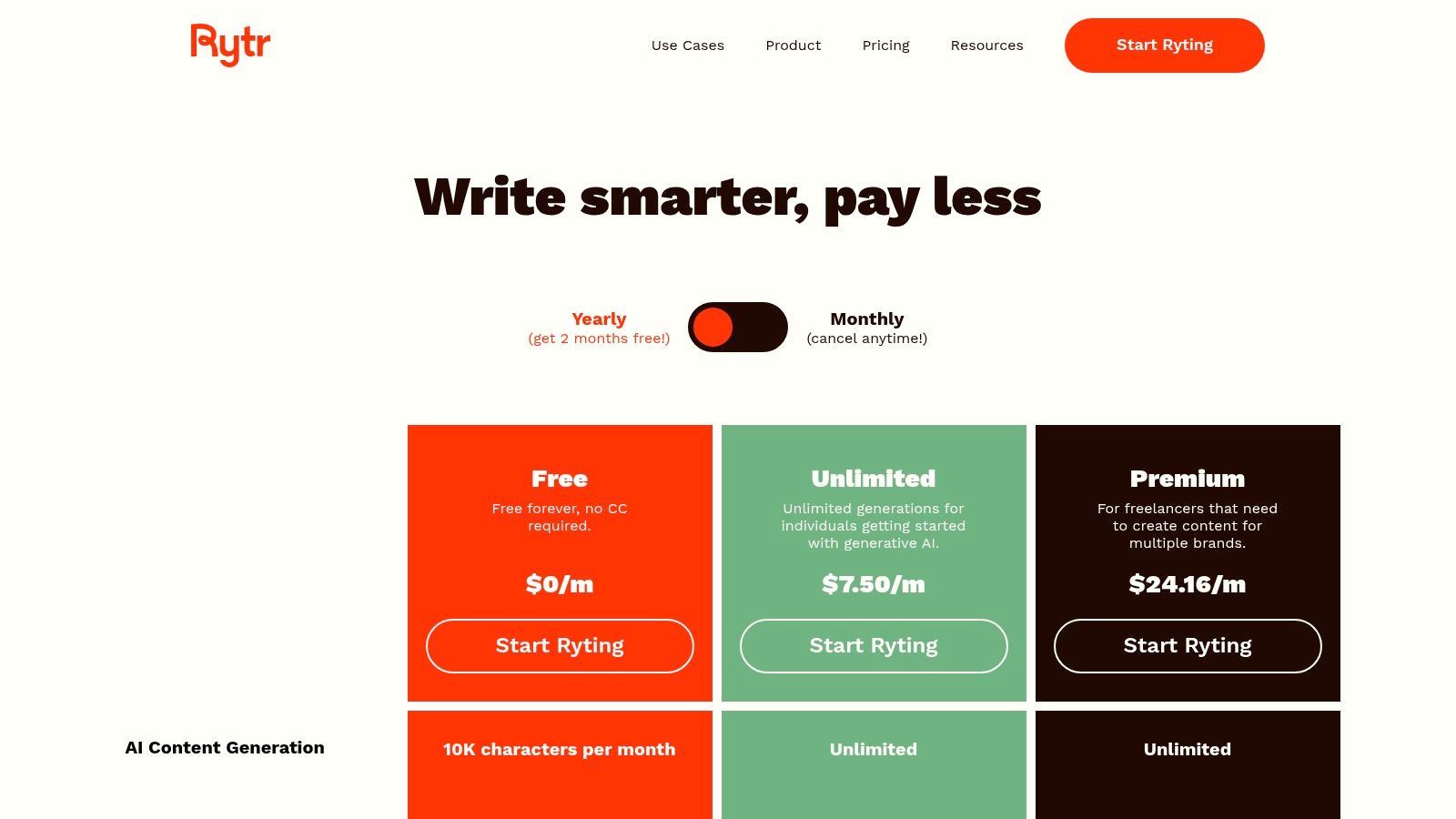
Rytr has positioned itself as the perfect choice for creators and marketers who want a powerful AI writer without the scary price tag. If you need to generate high-quality short-form content—like social media posts, product descriptions, or ad copy—and you need to do it fast, Rytr is easily one of the best AI content writing tools for the job. It has a clean, simple interface that ditches the complexity you’ll find in bigger, enterprise-focused platforms.
The beauty of Rytr is its “good enough for most” philosophy, which it nails perfectly. It doesn’t try to be an all-in-one marketing suite. Instead, it focuses on doing one thing really well: AI-assisted writing. It offers over 40 use cases and supports more than 30 languages, making it a super versatile tool for freelancers, bloggers, and small business owners who just need to get things done.
Key Features & Use Cases
Rytr’s biggest strengths are speed and simplicity. You pick a use case, give it a little context, choose from over 20 writing tones (from “Convincing” to “Inspirational”), and boom—you’ve got compelling copy in seconds. It even has a built-in plagiarism checker on its paid plans.
- Best For: Solo bloggers, freelance writers, and small businesses on a tight budget who need to produce a lot of short-form content quickly.
- Standout Feature: Its extremely generous free plan and dirt-cheap unlimited plan make it one of the most accessible AI writers out there.
- Practical Tip: Use the “Magic Command” tool to give Rytr custom instructions. Instead of just using a template, you can tell it to “write three funny tweets about coffee,” which gives you a lot more creative freedom.
Pricing and Limitations
Rytr’s pricing is its killer feature. The value is just unbeatable. But, that accessibility means it has some limits when it comes to advanced features and long-form content.
| Plan | Starting Price | Key Limitation |
|---|---|---|
| Free | $0/month | 10,000 characters per month limit |
| Saver | $9/month | 100,000 characters per month limit |
| Unlimited | $29/month | No character limits, dedicated account manager |
The main drawback is that for complex, long-form articles, the AI’s output can sometimes lack the depth you’d get from a tool like Jasper. Also, the most useful features, like the plagiarism checker, are only available on the paid plans.
8. Anyword
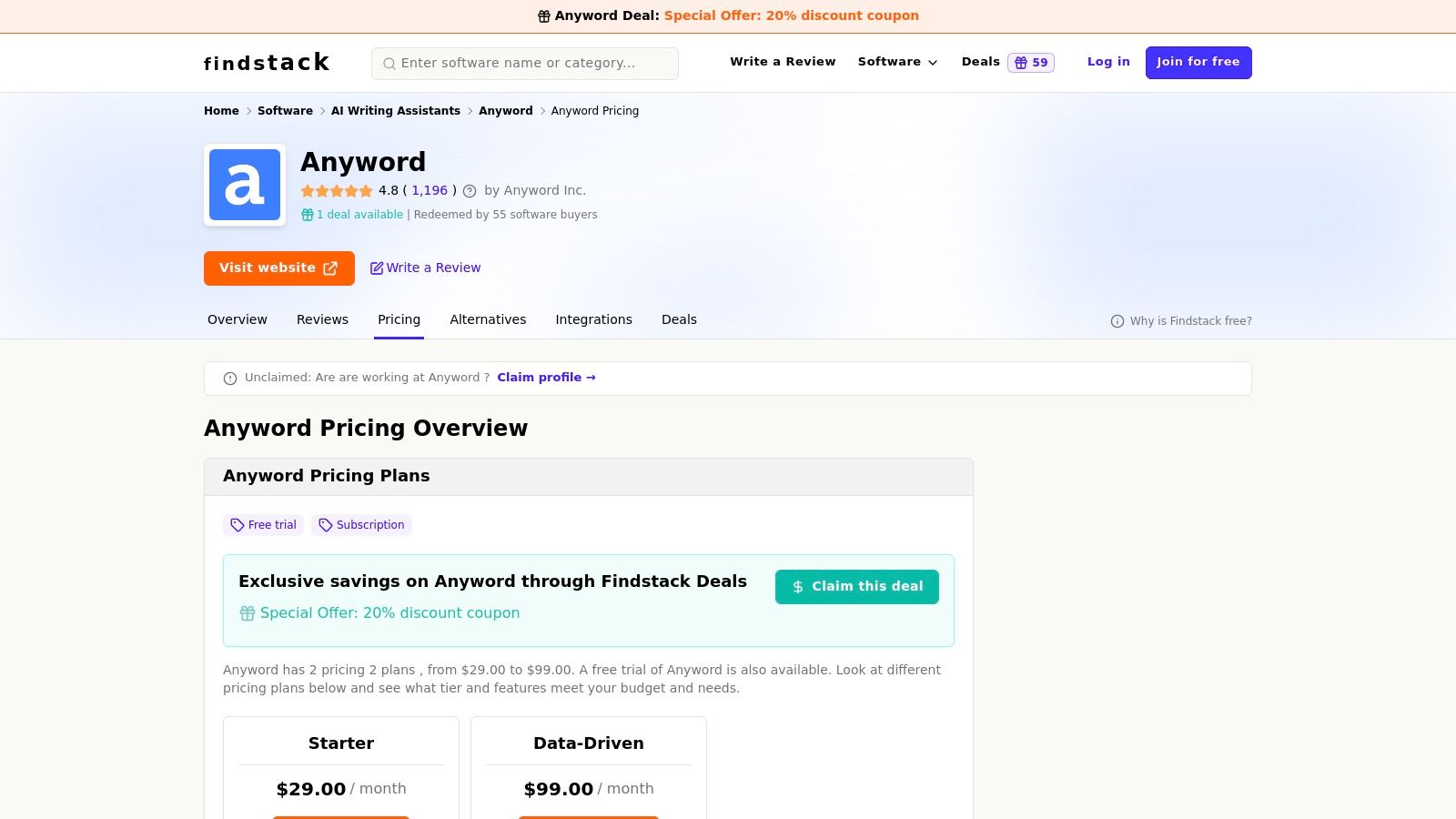
Anyword isn’t just another AI writer. It’s a data-driven copywriting platform built for one thing: performance. While other tools focus on just generating text, Anyword takes it a step further by predicting how well that text will perform with your target audience. This makes it one of the best AI content writing tools for any team that’s obsessed with conversions.
Its secret weapon is the “Predictive Performance Score.” It analyzes your copy and gives it a grade based on its potential to engage and convert specific demographics. This means you can A/B test your ad headlines, email subject lines, and landing page CTAs before you even go live, saving you a ton of time and ad spend. For anyone running paid media campaigns, this is a huge advantage.
Key Features & Use Cases
Anyword is built to optimize copy for specific results, whether that’s generating leads or driving sales. For SaaS companies, a tool like this can be a key part of a successful SEO strategy.
- Best For: Performance marketers, paid media managers, and CRO (Conversion Rate Optimization) specialists who need copy that’s backed by data, not just intuition.
- Standout Feature: The Predictive Performance Score. It gives you an objective way to measure how effective your copy is, taking the guesswork out of the creative process.
- Practical Tip: Use the “Customer Personas” feature to train the AI on your ideal customer profiles. This makes sure the copy it generates and the performance score it gives are tailored to the audience you actually want to reach.
Pricing and Limitations
Anyword’s focus on performance data means its pricing is aimed at professional marketers and teams, which can be a hurdle for solo users.
| Plan | Starting Price | Key Limitation |
|---|---|---|
| Starter | $49/month | Limited to 1 user seat, 1 Brand Voice |
| Data-Driven Teams | $99/month | Adds scoring for multiple channels, 5 Brand Voices |
| Business | Custom Pricing | Full API access, unlimited seats, custom models |
The main limitation is that the best predictive features and unlimited scoring are locked away in the higher-tier plans. Also, you have to contact their sales team for some of the enterprise pricing details. But they do offer a 7-day free trial, which is enough time to test its core features.
9. Sudowrite
While most tools on this list are all about marketing and SEO, Sudowrite is completely different. It has carved out a unique niche, making it one of the best AI content writing tools for a very specific group: authors. This is an AI-powered creative writing partner built for fiction and non-fiction writers. It’s designed to help them brainstorm, expand on ideas, and smash through writer’s block.
Sudowrite isn’t built to churn out blog posts; it’s designed to be a creative partner. Its features are all about storytelling—from developing interesting characters and complex plots to rewriting a clunky paragraph with more vivid language. For novelists, screenwriters, and hobbyists, it’s less of a content generator and more of a collaborator that makes the creative process better, not replaces it.
Key Features & Use Cases
Sudowrite is an expert in the art of storytelling. Its core features like “Write” (which continues your story in your own style), “Describe” (which adds sensory details), and “Rewrite” (which gives you different ways to phrase things) are amazing for long-form creative projects.
- Best For: Fiction authors, screenwriters, and creative non-fiction writers who want a partner for brainstorming, drafting, and polishing their work.
- Standout Feature: The “Story Bible” feature. It’s a place where you can store all your character details, plot points, and world-building notes. The AI can then reference this to keep everything consistent throughout your manuscript.
- Practical Tip: Use the “Brainstorm” feature to generate lists of character names, plot twists, or even ideas for magic systems. It’s a fantastic way to get unstuck when you’re staring at a blank page.
Pricing and Limitations
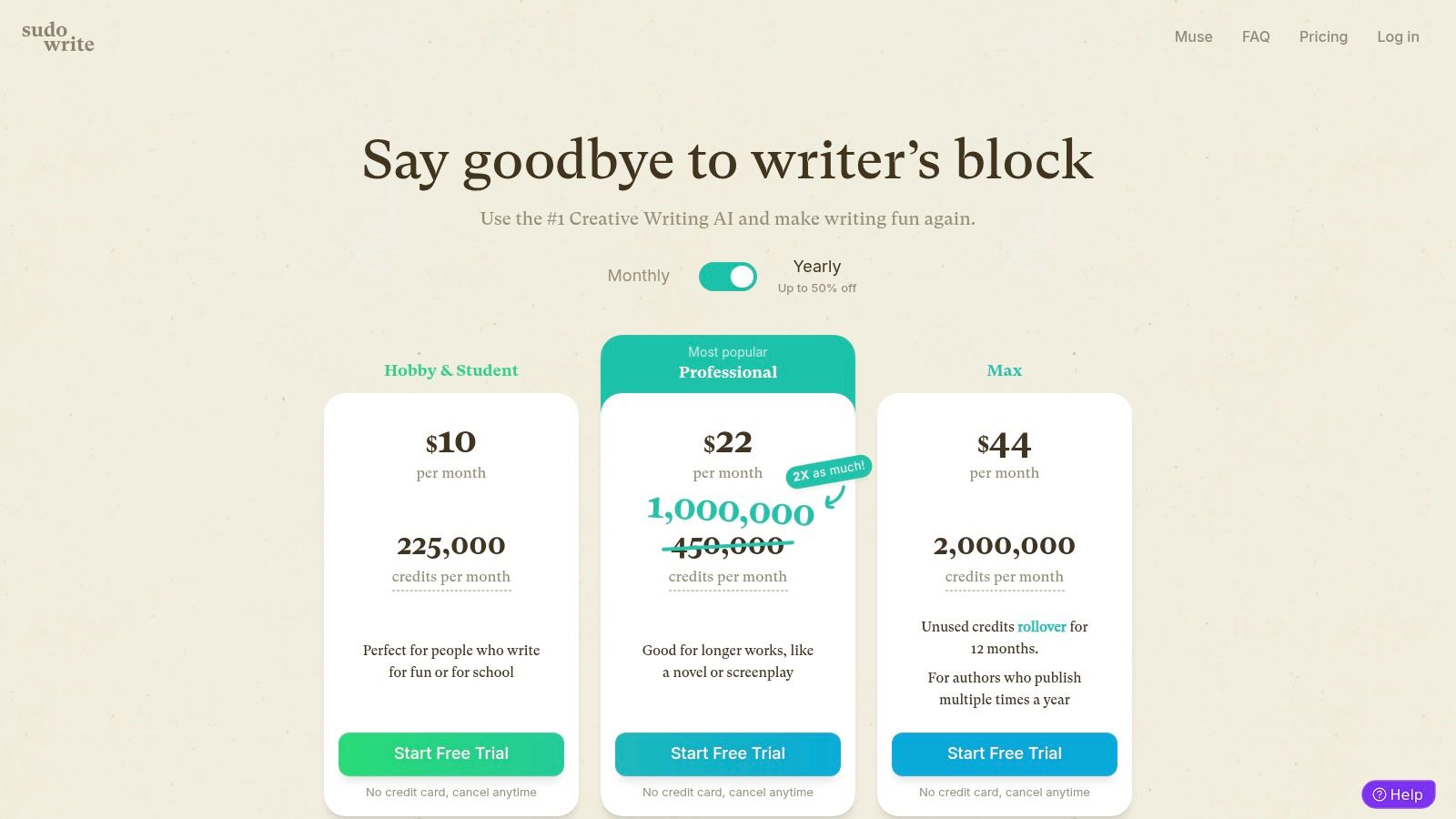
Sudowrite uses a credit-based system, and different AI models use up different amounts of credits. This is flexible, but you have to keep an eye on your usage.
| Plan | Starting Price | Key Limitation |
|---|---|---|
| Hobby & Student | $10/month | 30,000 credits, no rollover |
| Professional | $25/month | 90,000 credits, no rollover |
| Max | $100/month | 300,000 credits, with rollover |
The main limitation is its singular focus. If you need a tool for marketing copy, SEO articles, or business reports, Sudowrite is not the tool for you. The credit system can also feel a bit tight for writers who draft a lot every day on the lower-tier plans.
10. QuillBot
QuillBot isn’t a long-form content generator like Jasper or Copy.ai. Instead, it has mastered its own niche, becoming one of the best AI content writing tools for refining and perfecting text that you’ve already written. It’s an amazing editing partner, designed to improve clarity, change the tone, and check for originality with surgical precision.
What makes QuillBot a go-to tool for millions of students, writers, and marketers is its seriously powerful paraphrasing engine. You can paste in a clunky paragraph, and its AI will suggest a bunch of different ways to rewrite it. You just pick the version that fits best. It’s less about creating from scratch and more about elevating your existing work, making it clearer, more concise, or more professional.
Key Features & Use Cases
QuillBot excels at the micro-level of writing: sentence structure, word choice, and flow. Its suite of tools works together to act as a final polish before you hit publish, making it ideal for quick draft improvements and academic writing.
- Best For: Students, academics, bloggers, and editors who need to rephrase content, summarize long documents, or ensure their writing is grammatically perfect and plagiarism-free.
- Standout Feature: The seven different paraphrasing modes (Standard, Fluency, Formal, Simple, Creative, Expand, and Shorten). This gives you incredible control over the tone and style of the final text.
- Practical Tip: Use the Google Docs or Microsoft Word add-on. It brings the paraphraser and grammar checker right into your document, which saves you from constantly switching between tabs.
Pricing and Limitations
QuillBot has a great free plan, but its real power is unlocked with a very affordable premium subscription. The main limitation is that it’s an assistant, not a creator of full articles.
| Plan | Starting Price | Key Limitation |
|---|---|---|
| Free | $0/month | 125-word limit on Paraphraser, 2 writing modes |
| Premium | $8.33/month (billed annually) | No word limits, unlocks all modes, advanced grammar checks |
The primary downside is that it can’t generate a complete blog post from a simple prompt. It needs existing text to work its magic. But for improving and repurposing content, its value is hard to beat, and the premium plan is one of the most cost-effective AI tools you can get.
11. Grammarly (Pro/Enterprise)
Look, everyone knows Grammarly. But its evolution from a simple spell-checker into a full-blown AI writing partner is why it’s on this list of the best AI content writing tools. While many tools focus on creating content from scratch, Grammarly’s superpower is refining, correcting, and improving what you’ve already written. It’s an essential quality control layer for any serious content team.
What sets Grammarly apart is its ridiculously smooth integration and mature user experience. It works everywhere you write—your browser, email, Google Docs, desktop apps, you name it. The AI suggestions go way beyond basic grammar, offering tips to improve clarity, tone, and conciseness. It’s basically like having an editor looking over your shoulder 24/7, making sure everything you write is polished and professional.

Key Features & Use Cases
Grammarly’s strength is its real-time feedback. It doesn’t just improve the document you’re working on; it helps you become a better writer over time. Its newer generative AI features can rewrite sentences, summarize text, and even brainstorm ideas, all within your existing workflow.
- Best For: Individuals and teams of all sizes who need a rock-solid tool for editing, proofreading, and keeping brand tone consistent across all written communication.
- Standout Feature: The tone detector and style guide feature (in the Business plans) is huge for teams. It helps maintain a consistent voice, which is a key part of good on-page SEO strategies.
- Practical Tip: Use the goal-setting feature before you start writing. Tell Grammarly who your audience is, how formal you want to be, and what your intent is. This helps it give you much more targeted and useful suggestions.
Pricing and Limitations
Grammarly has a strong free version, but its most powerful AI and team features are behind a subscription. Some users have reported issues with billing and customer support, so it’s a good idea to manage your subscription carefully.
| Plan | Starting Price | Key Limitation |
|---|---|---|
| Free | $0 | Basic spelling, grammar, and punctuation checks. |
| Premium | $12/month | Advanced features like tone adjustments, plagiarism detection, and full-sentence rewrites. |
| Business | $15/member/month | Includes everything in Premium, plus a style guide, brand tones, and admin controls like SSO. |
The main limitation is that its generative AI is less focused on long-form content creation compared to tools like Jasper or SEObotai.com. It’s more of a co-editor than a primary writer. But for teams focused on quality and consistency, it’s an essential part of the toolkit.
12. AppSumo (AI Writing Deals)
AppSumo isn’t a single AI writer.
It’s a bustling marketplace where you can find lifetime deals on some of the best AI content writing tools.
For solopreneurs, bloggers, and small businesses watching every penny, this platform is a goldmine. It’s a unique chance to get powerful, often newly launched tools for a one-time fee, letting you dodge those painful monthly subscriptions.
What makes AppSumo a must-visit destination is its model.
It’s a launchpad for innovative AI startups, giving you early access to tools before they hit the big time.
The community aspect is also huge. Each deal page is filled with unfiltered reviews and a Q&A section where you can ask the developers direct questions before you buy. This transparency is awesome for vetting a tool’s capabilities and the team behind it.

Key Features & Use Cases
AppSumo lets you build a powerful content creation toolkit without committing to recurring costs. The deals are often on lesser-known but highly effective tools that specialize in niches like SEO content, ad copy, or long-form articles.
- Best For: Freelancers, bootstrapped startups, and small marketing teams who want to experiment with different AI tools without the financial headache of subscriptions.
- Standout Feature: The 60-day money-back guarantee on most deals. This gives you a generous, risk-free window to really test if a tool works for your specific needs.
- Practical Tip: Create an account and subscribe to their newsletter. The best deals often sell out fast, so getting notified when they drop is the key to snagging top-tier tools.
Pricing and Limitations
The pricing is the main attraction, but the model has its trade-offs. You’re often betting on a newer company’s future success.
| Plan | Starting Price | Key Limitation |
|---|---|---|
| Lifetime Deals | Varies (often $49-$79) | Deals are time-sensitive and can sell out or expire. |
The main downside is the “first-come, first-served” nature of the deals. If you miss a great tool, it might never come back at that price. Also, customer support and future updates are handled by the individual companies, and their long-term stability can vary.
Top 12 AI Content Writing Tools Comparison
| Item | Core Features/Characteristics | User Experience / Quality ★★★★☆ | Value Proposition  | Target Audience  | Unique Selling Points  |
|---|---|---|---|---|---|
| Jasper | Brand voice, templates, multi-seat, AI image tools | Enterprise-ready, strong brand control ★★★★☆ | Seat-based pricing, 7-day free trial | Marketing teams, enterprises | Enterprise controls, brand governance  |
| Copy.ai | Multi-LLM chat, workflow builder, Content Agents | Robust automation, easy to start ★★★☆☆ | Generous free plan, advanced costly | Sales/marketing teams | Multi-model access, workflow credits |
| Writesonic | Long/short content, SEO tools, site audits | Wide feature set, competitive pricing ★★★★☆ | Annual savings, some pricing confusion | Bloggers, eCommerce, SEO pros | GEO visibility, SEO and content integration |
| SEObotai.com | SERP analysis, factual content, SEO-first workflow | Data-driven, specialized UX ★★★★☆ | Competitive for SEO focus | SEO professionals, agencies | Real-time SERP data integration |
| Outrank.so | Automated briefs, optimization scoring, topical authority | Strategic, methodical workflow ★★★★☆ | Premium, strategy-focused pricing | Content strategists, SEO teams | Guided long-form content creation |
| Notion (w/ AI) | AI writing in docs, enterprise search, meeting notes | Contextual content, learning curve ★★★☆☆ | AI in Business tier, trial for Plus | Teams, documentation-focused | Connected workspace, AI integration |
| Rytr | Multiple tones, free tier, plagiarism checks on premium | Simple, fast onboarding ★★★☆☆ | Very low entry price | Budget users, small teams | Affordable unlimited plans, multilingual |
| Anyword | Predictive scoring, brand bank, plagiarism checker | Data-driven, conversion-focused ★★★☆☆ | Pricier, requires signup | Paid media, landing pages | Predictive performance, paid media focus |
| Sudowrite | Long-form fiction, scene/plot tools, credit system | Best creative writing ★★★★☆ | Credit limits may restrict heavy use | Authors, creatives | Creative writing specialist |
| QuillBot | Paraphrasing, summarization, grammar checks | Affordable, strong paraphrasing ★★★☆☆ | Free limits, premium affordable | Quick draft improvement users | Paraphrase and summarization focus |
| Grammarly (Pro/Ent) | Grammar, tone, rewrite, SSO, multi-platform support | Polished UX, trusted ★★★★☆ | Paid tiers required for full features | General and professional writers | Comprehensive writing assistant, enterprise |
| AppSumo | Time-limited deals, refund policy, diverse tools | Real user reviews ★★★☆☆ | Deep savings via lifetime deals | Deal hunters, startups | Lifetime deals, mix of tools |
Which Tool Will You Choose?
So there you have it. We’ve taken a tour through the wild world of the best AI content writing tools, from the enterprise-level power of Jasper to the creative genius of Sudowrite and the SEO-focused precision of Outrank.so. The market is absolutely exploding with options, and it’s easy to see why. These platforms are no longer just cool toys; they are becoming mission-critical assets for any modern content team.
Here’s the most important takeaway: there is no single “best” tool that wins in every category. The right choice for you is deeply personal. It depends entirely on your specific workflow, your goals, and your budget. What works for a solo blogger trying to speed up their drafting process is completely different from what a large B2B marketing team needs to maintain brand voice across a dozen channels.
Making Your Final Decision: A Quick Recap
Let’s boil it all down. As you think about your options, figure out which of these situations sounds most like you:
- For Enterprise-Level Control and Scalability: If you’re managing a big team, need a unified brand voice, and require powerful collaboration features, Jasper is still the heavyweight champion. Its feature set is built for serious, scaled-up content operations.
- For Performance-Driven Marketing and Copy: When your main goal is getting that conversion, and you need AI that’s trained on what actually works, Anyword and Copy.ai are fantastic choices. Their focus on predictive performance and sales-oriented frameworks can give you a serious edge.
- For SEO-Focused Content and Long-Form Articles: This is where newer, more specialized tools like SEObotai.com or Outrank.so absolutely shine. They are built from the ground up for SEO. They integrate keyword research, SERP analysis, and content optimization right into the writing process, making them ideal for anyone serious about ranking. Writesonic also offers a great balance of SEO features and general writing tools.
- For Budget-Conscious Startups and Individuals: If you need a powerful assistant without the scary price tag, Rytr offers an unbeatable mix of affordability and functionality. And if you’re already living in a specific ecosystem, Notion AI provides incredible value right inside your existing workspace.
- For Polishing and Perfecting Your Final Draft: Don’t forget that AI isn’t just for creating new stuff. Tools like Grammarly and QuillBot are essential for that final, critical editing stage. They make sure your AI-assisted content is polished, professional, and sounds human.
The Human Element: Your Most Important Asset
It’s crucial to remember the golden rule of AI content creation: these tools are accelerators, not replacements. They are incredibly powerful assistants that can demolish writer’s block, generate endless ideas, and handle the heavy lifting of first drafts. But they can’t replace your strategic insight, your unique voice, or your understanding of your audience.
The real magic happens when you pair one of the best AI content writing tools with a smart, human-led content strategy. Use the AI to build the framework, and then use your expertise to add the nuance, storytelling, and final polish that an algorithm simply can’t replicate. Think of it as a partnership where the AI handles 80% of the grunt work, freeing you up to focus on the 20% that truly drives results.
So, the next step is yours. Don’t get stuck in analysis paralysis. Pick one or two tools from this list that resonate with your goals, sign up for a free trial, and get your hands dirty. The best way to find your perfect fit is to see how it integrates into your actual, day-to-day work.
Now, I want to turn it over to you. Which tool from this list are you most excited to try? Or are you already using an AI writer that you love? Drop a comment below and let me know.
Feeling overwhelmed by the strategy side of things? Choosing a tool is just one piece of the puzzle. To truly dominate the SERPs, you need a cohesive SEO strategy that leverages that tool effectively. At Visibility Ventures, we specialize in building data-driven SEO engines for businesses ready to scale. We can help you turn your AI-powered content into a predictable source of organic traffic and leads. Book a strategy call with us today to see how we can build your content machine.