
Most local businesses fail at SEO because they aim for national rankings instead of focusing on their immediate community.
Ranking for "best cosmetic dentistry tips" won’t bring in patients if you’re a dentist in Phoenix.
The key is targeting local intent – keywords that include your services and the areas you serve.
Key takeaways:
- Nearly 50% of Google searches are local, and 28% lead to a purchase within 24 hours.
- Local keywords are less competitive and more likely to convert because they target users ready to act.
- Tools like Google Keyword Planner and SEMrush can help identify search trends and competitor gaps.
The 6-step process:
- Define your services and target locations.
- Use tools like Google Keyword Planner to validate local search volume.
- Analyze competitor keywords in your area with SEMrush.
- Focus on transactional keywords that drive immediate action.
- Target long-tail and neighborhood-specific keywords for better conversions.
- Optimize your location pages and track performance using Google Search Console.
Local SEO success isn’t about chasing traffic – it’s about targeting specific, high-intent keywords that drive calls, visits, and bookings.
Start small, focus on one service and location, and expand as you see results.
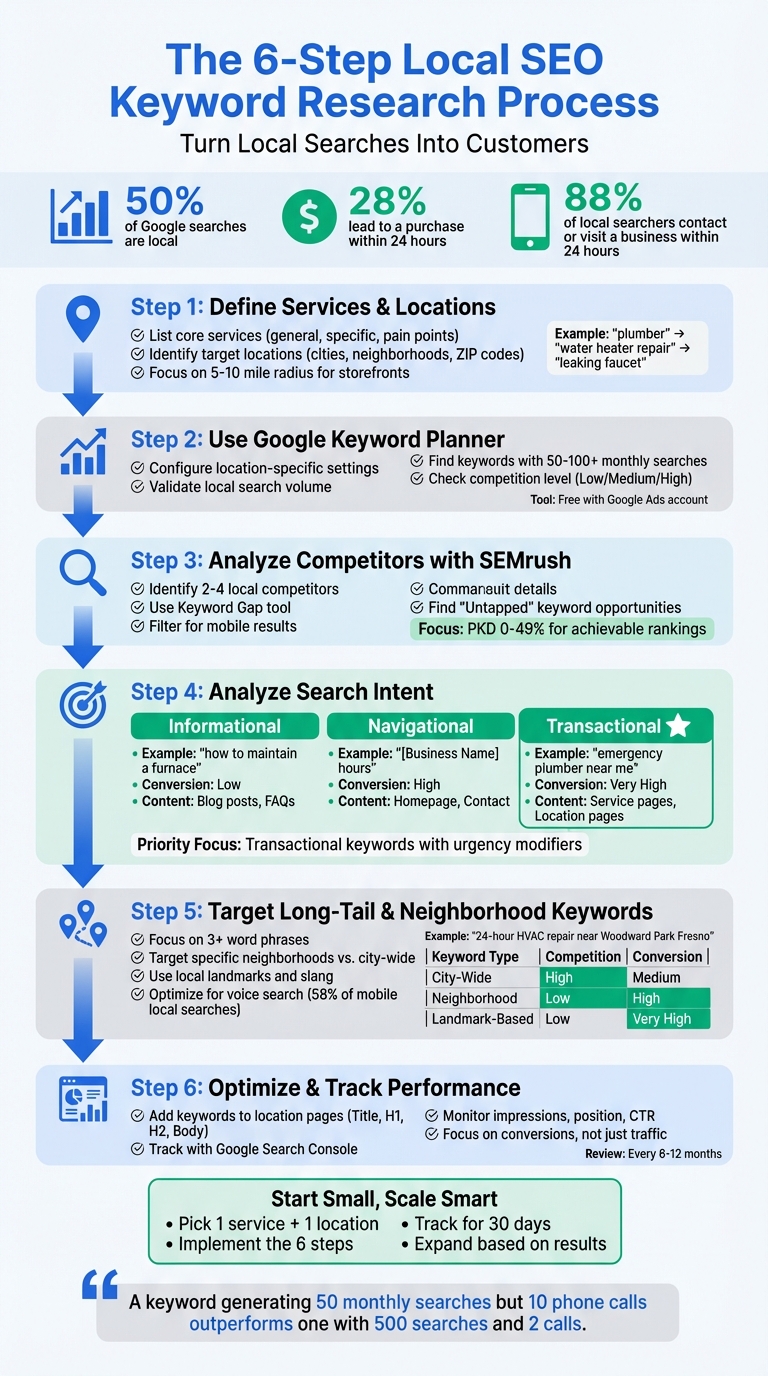
6-Step Local SEO Keyword Research Process for Service Businesses
How to Find Keywords for Local SEO Easily (650+ Pages Built This Year)
Step 1: Define Your Services and Target Locations
The first step is to clearly define what your business offers and the areas you serve.
Before diving into tools like Google Keyword Planner or SEMrush, you’ll need a seed list – a basic inventory of your services and operational locations.
This ensures your keyword strategy aligns with what you actually provide, avoiding wasted effort on irrelevant terms.
List Your Core Services and Products
Start by organizing your services into three categories: general business terms (e.g., "plumber", "HVAC contractor"), specific services (e.g., "water heater repair", "emergency pipe burst"), and customer pain points (e.g., "leaking faucet", "no heat in winter").
The last category is especially important because most people search for solutions to their problems, not the official name of your service.
Here’s a tip: ask your front-desk team or call center to track the exact phrases customers use when they contact you.
For instance, if customers often say "my AC won’t turn on" instead of "air conditioning repair", that’s a keyword worth noting.
An HVAC contractor I worked with once discovered that "furnace won’t ignite" was a frequent phrase during winter calls, yet it wasn’t mentioned anywhere on their website.
Don’t forget to include features and amenities that set you apart.
Keywords like "24-hour emergency service", "pet-friendly appointments", or "free estimates" can make a big difference.
For example, a dentist might highlight "walk-in appointments" or "sedation dentistry" to attract more specific searches.
Once you’ve detailed your services, connect them to the exact locations you serve.
Identify Your Target Locations
Create a detailed list of all the cities, neighborhoods, ZIP codes, and landmarks your business covers.
For storefront businesses, focus on a 5-10 mile radius around your location.
If you’re a service area business, like a plumber or HVAC contractor, or managing local SEO for multiple locations, list every city or neighborhood you’re willing to travel to.
Be precise – rather than just saying "Dallas", break it down into areas like "Uptown Dallas", "Oak Cliff", or "Richardson."
"Local keyword research involves identifying the specific terms and phrases potential customers use when searching for products or services in their area." – Rank Math
Use Google Autocomplete to validate your target locations. For example, type your service + "in" or "near" into Google and see what suggestions pop up.
If "plumber in North Fresno" appears, it’s a sign that people are searching for that term.
Competitor Google Business Profiles can also reveal which location-based keywords they’re targeting, helping you find opportunities they might have missed.
Be mindful of regional vocabulary too. In some areas, people say "sub", while in others, it’s "hoagie."
Check community forums like Nextdoor or directly ask your customers to uncover these local language nuances. Using the exact terms your audience searches for can give you a major edge.
Step 2: Use Google Keyword Planner for Search Volume and Competition Data
With your seed keywords from Step 1 in hand, it’s time to validate them using real-world data.
Google Keyword Planner is an excellent tool for this because it pulls directly from Google’s own search engine data. If you haven’t already, set up a free Google Ads account to access it.
One of the tool’s standout features is its ability to provide location-specific data.
For instance, while a keyword like "HVAC repair" might show thousands of searches across the country, your local area might only contribute a small fraction of that.
Knowing the local search volume is what truly matters for your business.
Configure Location-Specific Keyword Research
Before diving into keyword research, ensure your location settings are correct.
After logging into Google Keyword Planner, head to the "Discover new keywords" section.
At the top of the interface, you’ll see a location filter, which is often set to "United States" by default.
Adjust this filter to focus on your specific city, county, or ZIP code.
For example, if you’re a plumber in North Fresno, set the location to "Fresno, CA", or narrow it further to ZIP codes like 93720 or 93711.
If your business spans multiple cities, you can create a custom location that includes all your target areas.
This ensures that the data you see – search volume, competition, and cost-per-click – accurately reflects your local market.
If you’re targeting a small town and Keyword Planner shows "0" search volume for a specific term, don’t dismiss it outright.
For example, if "plumber in Clovis" shows no volume, try checking the broader term "plumber" to assess general interest. Then, manually add "Clovis" back to your list.
A zero might just mean the volume is too low to register, not that no one is searching.
Find Keywords with Good Volume and Low Competition
Once your location settings are in place, you can begin refining your keyword list.
Enter your seed keywords, and Google Keyword Planner will display metrics like Average Monthly Searches, Competition (Low/Medium/High), and Top of Page Bid.
For local businesses, even keywords with 50–100 monthly searches can be valuable, especially if paired with low-to-medium competition.
Pay attention to high cost-per-click (CPC) values, as they often indicate strong commercial intent.
For example, if plumbers are bidding heavily on "emergency water heater repair Fresno", it’s a clear sign that this keyword has significant value and could drive leads for your business.
Long-tail keywords, such as "24-hour emergency plumber in Fresno", are another goldmine.
These phrases tend to have less competition and convert better because they reflect a searcher’s specific needs.
Many HVAC contractors have seen faster results targeting these long-tail terms compared to broader, more generic ones.
"Keywords with low competition might offer easier opportunities for ranking, though they may have lower search volumes. Striking a balance between search volume and competition is key." – Rank Math
Finally, once you’ve gathered your keyword data, export the list and refine it further. Remove any terms that don’t align with your services or service areas.
For instance, if "pool heater repair" appears but isn’t something you offer, delete it – even if the search volume looks tempting.
Keep only the keywords that are relevant to your business and location.
Step 3: Use SEMrush to Find Competitor Local Keywords
Once you’ve validated your seed keywords using Google Keyword Planner, it’s time to dig deeper by analyzing what works for your competitors.
Many local businesses miss out on this step, but it’s a goldmine for uncovering keywords that drive local traffic.
SEMrush simplifies this process, especially when fine-tuned for local SEO services.
By focusing on competitors in your geographic area, SEMrush helps you identify keyword gaps that could boost your local search rankings.
For instance, if you’re an HVAC contractor in Fresno, you’re not interested in what a national chain ranks for.
Your real competition is that local HVAC shop a few miles away that’s pulling in Google Maps traffic.
Review Competitor Keyword Rankings
First, identify your actual local competitors.
Open SEMrush’s Domain Overview tool and enter your domain. Scroll to the "Main Organic Competitors" section to see which websites are vying for similar keywords.
For businesses with multiple locations, use the specific URL for a location page (e.g., yoursite.com/locations/fresno) and set the search type to "Exact URL." This ensures you’re analyzing competitors for that particular area.
After identifying two to four local competitors, head over to the Keyword Gap tool.
Enter your domain in the first field and your competitors’ domains in the others.
Don’t forget to adjust the location filter to your target city or region so the data reflects local search behavior instead of national trends.
Here’s a pro tip: switch the results to "Mobile."
Nearly half of Google searches are local, and most of these happen on mobile devices.
Since local users often search on their phones, this setting gives you a more accurate view of the competition.
Filter the competitor rankings to show only the Top 10 results, and use Advanced filters to exclude branded terms (e.g., "Joe’s Plumbing Fresno").
Focus instead on generic service keywords with location modifiers.
Find Keyword Gaps and Opportunities
Next, explore the "Untapped" tab in the Keyword Gap tool.
This reveals keywords your competitors rank for but you don’t, highlighting potential opportunities.
For example, if your competitors rank for "ductless mini split installation Fresno" and you haven’t targeted that term, it’s a clear gap you can address.
Pay close attention to the Personal Keyword Difficulty (PKD%) column if it’s available.
Filtering for keywords with a PKD of 0–49 can help you zero in on terms that are achievable based on your site’s current authority and backlink profile.
Once you’ve identified 10–20 untapped keywords, export the list and add it to your keyword spreadsheet.
This step complements the earlier research you did in Google Keyword Planner, giving you a well-rounded list of local keywords complete with search volume and competition data.
These insights will be crucial when you move on to keyword mapping in Step 5.
Step 4: Analyze Search Intent for High-Conversion Keywords
Once you’ve got your SEMrush keyword list, the next step is figuring out which ones actually bring in customers.
Not all keywords are created equal. A keyword with 500 monthly searches might not convert at all if the intent doesn’t align with your business goals, while a keyword with just 50 searches could lead to 10 phone calls if it matches what the searcher needs.
The secret lies in understanding what the searcher is looking for when they type in a query. Google already interprets user intent – you just need to decode it for your strategy.
Understand the 3 Types of Search Intent
Every search falls into one of three categories, and each requires its own approach.
Let’s break them down to see how they affect conversions.
Informational intent:
These searchers are in research mode.
They’re looking to learn, not buy – yet. Queries like "how to maintain a furnace" or "when to replace a water heater" fit this category.
Google typically serves up blog posts, guides, or FAQs for these searches.
If you see articles dominating the top results, the intent is informational.
Navigational intent:
Here, users are trying to find a specific business or location they already know.
Searches like "[Your Business Name] hours" or "directions to [Business Name]" fall into this group.
These people are already familiar with your business and just need details like contact info or directions.
Your Google Business Profile and homepage should handle these queries.
Transactional intent:
This is where conversions happen.
These users are ready to act – they want to hire, buy, or book something immediately.
Phrases like "emergency plumber near me", "water heater repair San Francisco", or "24-hour locksmith" indicate urgent needs.
For these searches, Google prioritizes service pages, location pages, and the Local Pack (the map with three business listings).
To quickly identify intent, search the keyword yourself and check the top five results.
If you see service pages and the Local Pack, the intent is transactional.
If the results lean toward guides or blog posts, it’s informational.
Also, take note of specific SERP features. A Local Pack signals transactional or navigational intent, while Featured Snippets and AI Overviews usually indicate informational intent.
Fun fact: 96.5% of queries that trigger an AI Overview are informational.
With these categories in mind, your focus should shift to transactional keywords, as these are the ones that drive immediate action.
Focus on Transactional Keywords
For local service businesses, transactional keywords are the goldmine.
These are the phrases that lead to phone calls and bookings.
The formula is straightforward: service + location (e.g., "HVAC repair Fresno") or service + urgency modifier (e.g., "emergency plumber", "open now", "available today").
Look for terms like "hire", "book", "price", "cost", "near me", and "emergency" to capture this intent.
For example, a dentist in Phoenix should prioritize keywords like "teeth whitening Phoenix" or "emergency dentist near me" over informational ones like "what is teeth whitening."
Here’s a pro tip: check your Google Business Profile Insights under the "Performance" tab.
It shows the exact search terms people used to find your listing.
These are real, high-intent keywords that are already working for you. If "water heater installation Clovis" keeps showing up, that’s a keyword worth building a dedicated page around.
"A keyword generating 50 monthly searches but 10 phone calls outperforms one with 500 searches and 2 calls." – Isley Marketing
Additionally, don’t dismiss zero-volume keywords if they clearly show local intent. For example, if SEMrush lists "event center in [Small Town]" with "0" searches, but it’s relevant to your area, it could still bring in highly qualified leads.
Local search tools often underreport volume, especially for smaller towns or niche services.
Here’s a quick reference to help you map intent to the right content:
| Intent Type | Local Query Example | Conversion Potential | Where It Goes |
|---|---|---|---|
| Informational | "how to maintain a furnace" | Low (Awareness) | Blog posts, FAQs |
| Navigational | "[Business Name] hours" | High (Brand specific) | Homepage, Contact page |
| Transactional | "emergency plumber near me" | Very High (Action) | Service page, Location page |
This table helps you decide which keywords should go on high-conversion pages.
For local businesses, prioritizing transactional intent is key to turning searches into phone calls or visits.
Use this framework to assign keywords to the right pages – service pages for transactional terms and blogs for informational ones – as we’ll discuss in Step 5.
Step 5: Target Long-Tail and Neighborhood-Specific Keywords
Once you’ve organized your keywords by intent, it’s time to focus on a more localized approach.
Many businesses stick to broad city-level keywords like "plumber Dallas" and wonder why the phone isn’t ringing.
The issue? They’re up against countless competitors in a large metro area.
Meanwhile, someone searching for "emergency plumber Lower Greenville" is likely in urgent need, ready to call the first reliable option they find.
Why Long-Tail Keywords Matter for Local SEO
Long-tail keywords combine a service, a specific issue, and a location into a phrase with three or more words.
While these keywords may have fewer searches than broader terms, they attract users who are ready to take action.
For instance, "HVAC repair" might generate thousands of national searches, but a hyperlocal phrase like "24-hour HVAC repair near Woodward Park Fresno" could result in a handful of searches – each from someone with an immediate need.
Here’s why this works: nearly 50% of all Google searches are local. These users are looking for nearby services and are quick to convert if you show up for the right term.
I once worked with a Fresno HVAC contractor who ranked well for "HVAC Fresno" but wasn’t getting calls.
We shifted focus to long-tail phrases like "furnace won’t turn on Clovis" and "AC compressor replacement Fig Garden."
Within two months, his call volume doubled – not because of more traffic, but because the traffic was far more targeted.
Long-tail keywords also align with voice search, which now accounts for over 58% of local searches on mobile devices.
When people ask their phones, "Where’s the nearest vegan taco shop open now?" they’re using natural, conversational language that search engines are built to understand.
"I don’t think it will be too long before we are running many more queries by talking to our phones/watches instead of typing them into a search bar. It’s just so much more natural once we’re all used to searching conversationally." – Darren Shaw, Founder, Whitespark
To find these keywords, start with Google Autocomplete.
Type in your service and a neighborhood name to see what suggestions pop up.
Check People Also Ask for additional ideas, and ask your front desk or call center to note the exact phrases customers use when they call.
These are real-world search terms happening in your market.
The Power of Neighborhood-Specific Keywords
While city-wide keywords are helpful, focusing on neighborhood-specific terms like "plumber Lower Greenville" often leads to better conversions.
These hyperlocal terms may have lower search volumes, but they face less competition and attract users with stronger intent.
Think about it: if someone in Highland Park searches for "maid service Highland Park", they’re not interested in a service miles away.
They want someone local who understands their area. This is why 88% of local searchers call or visit a business within 24 hours.
Neighborhood-specific keywords work because they emphasize proximity.
Search engines now prioritize not only city-level data but also specific districts, commercial zones, and landmarks.
For example, if your website mentions "located two blocks from Civic Center", it’s more likely to rank higher for nearby searches.
To pinpoint the right neighborhoods, list every district, ZIP code, and landmark in your service area.
Don’t just focus on where your office is – think about where your customers live and work. An HVAC company in Fresno, for example, might target Tower District, Fig Garden, Woodward Park, and parts of Clovis, each with its own set of keywords.
Also, pay attention to local slang.
Residents might use nicknames for neighborhoods, like "The Mission" instead of "Mission District" or "Cap Hill" instead of "Capitol Hill." Check local Facebook groups, Nextdoor, or Yelp reviews to see how people refer to their areas.
These terms are often overlooked by competitors.
Avoid the mistake of creating cookie-cutter location pages that only swap out city names. Google recognizes templated content. Instead, craft unique pages with local testimonials, directions, and even photos of your work in that neighborhood.
Finally, don’t ignore "zero-volume" keywords in tools like SEMrush.
If you find a term like "event center in [Small Town]" with no reported searches but it’s relevant to your business, go for it.
SEO tools sometimes miss niche or hyperlocal queries, yet these searches can bring in highly qualified leads.
Here’s a quick guide to prioritizing neighborhood keywords:
| Keyword Type | Example | Competition Level | Conversion Potential |
|---|---|---|---|
| City-Wide | Dallas Plumber | High | Medium |
| Neighborhood | Emergency drain cleaning in Lower Greenville | Low | High |
| Landmark-Based | Coffee shop near Millennium Park | Low | Very High |
| Question-Based | How much does a bathroom remodel cost in San Francisco? | Medium | Medium |
Use this framework to map out your keywords. In the next step, we’ll assign these terms to specific pages to fill any content gaps.
Step 6: Add Keywords to Location Pages and Track Performance
Now that you’ve mapped your keywords and identified gaps, it’s time to put them to work on your location pages and measure their impact.
Many businesses make the mistake of cramming all their keywords into one spot without any real strategy – this approach doesn’t work and can actually hurt your optimization efforts.
Optimize Location Pages with Your Keywords
To make your location pages stand out, place your keywords thoughtfully and naturally.
Start with the title tag, which is the most critical on-page element for local SEO.
Use a format like: [Service] + [City or Neighborhood]. Examples include "Emergency Plumber in Lower Greenville" or "HVAC Repair in Fig Garden, Fresno."
Keep it concise – under 60 characters – to avoid truncation in search results.
Your H1 header should also include your primary keyword but with a slight variation from the title tag.
For instance, if your title is "Emergency Plumber in Lower Greenville", your H1 could read "24/7 Emergency Plumbing Services in Lower Greenville, Dallas."
Use H2 and H3 headers to incorporate related terms and mention local landmarks.
An H2 might say, "Serving Homes Near Mockingbird Station", while an H3 could highlight "Fast Response Times in the M Streets."
In the body content, weave your location into the text naturally.
Mention nearby landmarks, local challenges, or regional details.
For example, an HVAC contractor in Fresno might write: "Fresno summers often reach 105°F, so we offer high-SEER air conditioners built for Valley heat."
A plumber could reference local building codes or neighborhoods like Woodward Park or Shaw Avenue. These specifics signal to Google that your page is highly relevant to the area.
Avoid duplicating content across location pages.
Google penalizes duplicate content, so every location page should be unique.
Use distinct photos, customer reviews, staff bios, or maps to differentiate each page. If you serve multiple cities, each city should have its own tailored page.
When optimizing for "near me" searches, keep the language conversational.
Instead of awkward phrases like "We are the best plumber near me", try a Q&A format: "If you’re searching for ’emergency plumber near me,’ our Lower Greenville team is available 24/7."
This approach captures search intent without sounding forced.
Don’t overlook technical details.
Add descriptive alt text to images (e.g., "HVAC technician fixing furnace in Clovis") and use keywords in internal link anchor text.
Implement Local Business Schema markup to help search engines understand your business details like address, hours, and service areas.
| Element | Best Practice for Local Keywords | Avoid This |
|---|---|---|
| Title Tags | Include [Service] + [City/Neighborhood] | Keyword stuffing multiple cities |
| Headers | Use variations and mention local landmarks | Repeating the same phrase |
| Body Content | Reference local events or conditions | Using boilerplate text across all pages |
| Images | Use descriptive alt text | Generic file names like "image1.jpg" |
| "Near Me" Terms | Use Q&A or conversational phrasing | Phrases like "We are the best plumber near me" |
Once your pages are optimized, the next step is to measure whether these changes are actually driving results using Google Search Console.
Track Results with Google Search Console
After adding keywords to your location pages, it’s essential to track their performance.
Google Search Console (GSC) is an invaluable tool for this.
Go to the Performance report and filter by the URL of your location page (e.g., yoursite.com/locations/fresno).
This will show you which search queries are generating impressions and clicks for that page.
The Queries tab provides insight into the exact phrases people are searching for before landing on your page.
Check the Average Position for your target keywords to identify areas for improvement.
For instance, you might find that your page ranks for "24-hour plumber Fresno" but not "emergency plumber Fresno", even though both terms are closely related but differ in search volume.
If a keyword has high impressions but low click-through rates (CTR), consider rewriting your title tag or meta description to make them more engaging.
For pages ranking between positions 11–20, adding unique local content or improving internal linking could help push them onto page one.
Don’t forget to cross-check Google Business Profile (GBP) Insights.
The "Searches Breakdown" section shows the top keyword phrases triggering your Local Pack listing.
If a term is driving impressions for your GBP but not clicks to your website, it may be worth emphasizing that keyword on your location page.
Set up ranking alerts if your tracking tool supports it.
Alerts can notify you when a location-specific keyword enters or drops out of the top three results, allowing you to act quickly.
For businesses with multiple locations, monitor performance at the individual URL level rather than site-wide. One branch might rank well while another lags behind.
Finally, focus on tracking conversions, not just traffic.
Use GSC’s click metrics alongside data like clicks-to-call, direction requests, and form submissions from your location pages.
A keyword that generates 100 impressions and 5 calls is far more valuable than one with 500 impressions and no leads.
If a keyword brings traffic but no conversions, it might indicate a mismatch between search intent and your page content.
Revisit your optimization strategy to ensure you’re targeting terms with transactional intent rather than purely informational ones.
| Metric | What It Tells You | Action to Take |
|---|---|---|
| Impressions | How often your page appears in local searches | Improve title tags or meta descriptions if clicks are low |
| Average Position | Your rank for geo-specific terms | Add unique local content to improve rankings |
| CTR | Snippet relevance to local searchers | Optimize for mobile-friendly terms like "near me" or "open now" |
| Queries | Terms locals use to find your page | Integrate these terms naturally into your content |
Lastly, pay attention to "zero-volume" keywords in your tracking tools.
If GSC shows impressions for a term like "plumber near Woodward Park" but other tools report zero searches, trust GSC.
Hyperlocal or long-tail queries might not show up in external tools but can still drive quality leads.
If they’re relevant to your service area, they’re worth optimizing for.
Conclusion
Key Takeaways
You now have a clear roadmap for identifying and using local keywords that bring in calls and customers – not just website traffic.
The process begins with your business, not a tool.
Start by listing your services, service areas, and the problems your customers face.
After that, you can use resources like Google Autocomplete, People Also Ask boxes, and tools like SE Ranking or Semrush to refine and expand your keyword list.
Local search intent operates on an entirely different level than national SEO.
For instance, a plumber in Fresno targeting "emergency plumber near me" will face challenges that are nothing like those of a national brand offering general plumbing advice.
While local keywords often have lower search volumes and difficulty, they can deliver excellent conversion rates – 88% of local searchers contact or visit a business within 24 hours.
This highlights the power of hyperlocal keywords in generating leads that convert.
Organizing your keywords is crucial.
Divide them into categories for service pages, blog posts, and areas like reviews or profiles.
This approach separates businesses that only rank from those that actually generate conversions.
Once your keywords are mapped to specific pages, use tools like Google Search Console to track which queries are gaining traction. Pay attention to "zero-volume" keywords as well – tools often underestimate the importance of hyperlocal terms.
With these strategies in mind, let’s dive into what you should do next.
Next Steps for Your Local SEO
It’s time to put your knowledge into action. Start small – focus on one service and one city.
Choose the service that brings in the most revenue and the location where you see the highest demand.
Follow the six-step process outlined in this guide: build a location page, optimize your Google Business Profile with targeted keywords, and track your results over the next 30 days. If you notice more calls, direction requests, or form submissions, move on to the next service or city.
Revisit your keyword list every 6–12 months, or sooner if you’re adding services, expanding into new areas, or noticing ranking changes.
Consumer habits evolve, competitors shift tactics, and Google’s algorithms are constantly updated.
With nearly 46% of searches now having local intent and AI overviews appearing in over 40% of local queries, staying updated is essential to maintaining visibility.
If you’d rather have experts handle this for you – everything from keyword research and competitor analysis to page mapping and content planning – Visibility Ventures specializes in helping local service businesses.
Whether you’re a plumber, HVAC contractor, or dentist, we’ve helped businesses like yours dominate their local markets. Contact us here for a free SEO audit and uncover your biggest opportunities.
FAQs
How do I find local keywords people actually use?
To discover local keywords that real people are searching for, begin with free tools that highlight actual search habits. Start with Google Autocomplete – type in your service and city to uncover what users are actively searching for. Next, explore the "People Also Ask" section to identify common questions related to your services. Finally, review your Google Business Profile Insights to see the exact search terms customers have used to find you. These steps can generate 20–30 relevant keywords without needing paid tools.
What should I do if tools show zero search volume?
If keyword tools show zero search volume, shift your attention to Google Autocomplete, People Also Ask, and Google Business Profile Insights. These resources can provide a clearer picture of what people in your area are genuinely searching for. They help you tap into actual search intent and discover local keywords that might not show up in traditional tools. The best part? These methods are free and give you direct access to terms your customers are actively using.
Do I need a separate page for each city or neighborhood?
When deciding whether to create separate pages for each city or neighborhood, it really comes down to your service area and overall strategy. For many local businesses, having dedicated pages can help you target specific local keywords like "[service] in [city]", giving you a better shot at showing up in local search results. This approach is especially effective for ranking in local packs and maps.
That said, if your service area is small or the locations are closely grouped, a single, well-optimized page might be enough to cover your bases. It’s all about balancing effort with the potential benefits for your specific situation.